
Products

Menu

Hospital Thermal Receipt Printer Buying Guide: HIS/EMR Integration for Billing, Pharmacy & Clinical Workflows

TL;DR:

  • Hospital desktop thermal receipt printers are widely used in billing, pharmacy, and outpatient departments to generate fast, system-integrated receipts and patient tickets.
  • They are typically deployed as part of EMR and HIS workflows, where stability, speed, and network reliability matter more than advanced printing features.
  • high-volume departments such as billing counters and pharmacy windows typically require stable network-connected printers like HPRT TP806C, while compact models such as HPRT TP80NC-H are more suitable for clinic desks and nurse stations.

Hospital thermal receipt printers print slips, receipts, tickets, and patient documents across clinical environments. At billing counters, doctor consultation rooms, and other service points, they connect to EMR and HIS systems and generate output when patients register, pay, or collect medication.

This guide helps healthcare IT departments choose and deploy desktop thermal printers in real hospital environments. It explains key selection factors such as system integration, workload differences, and deployment needs across departments. It also introduces two field-tested models, HPRT TP806C and HPRT TP80NC-H, for different hospital use cases.
Where are Desktop Thermal Receipt Printers Used in Hospitals?

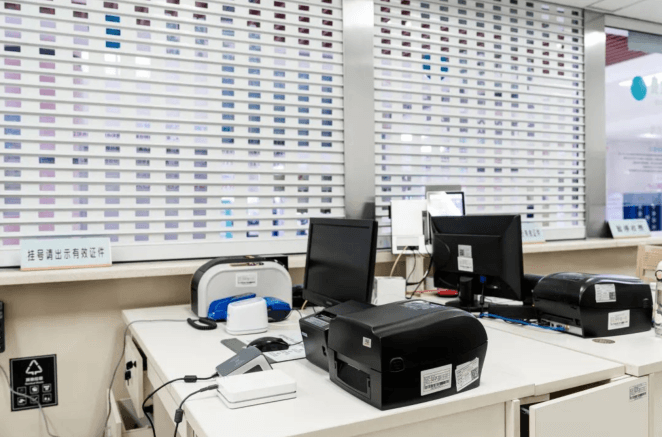
doctor-consultation-rooms
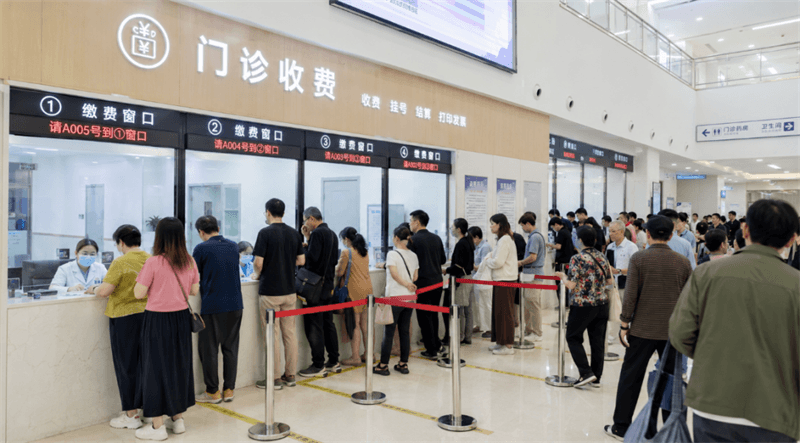
hospital-billing-counter

In daily clinical operations, desktop thermal printers are mainly used in four high-frequency areas:

  • 1
    Billing Counters: High-volume payment and deposit receipts handled by cashier staff during morning peak hours.
  • 2
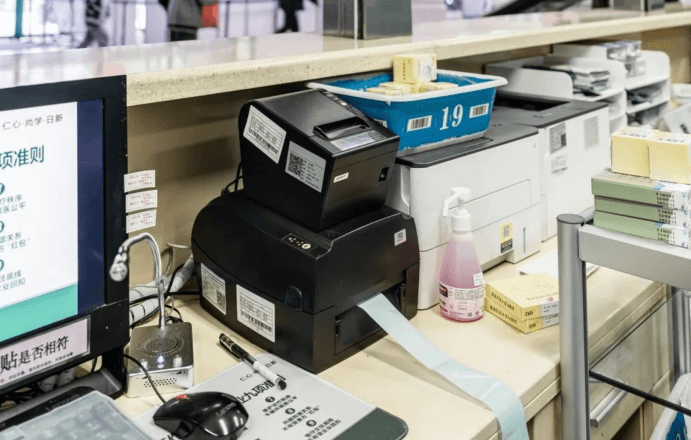
    Pharmacy Desks: Medication dispensing tickets and lengthy instructions printed directly at the pharmacy window.
  • 3
    Specimen Collection Centers: Fast transactional patient receipts and verification slips at high-traffic blood draw booths.
  • 4
    Doctor Consultation Rooms: On-demand registration slips, referral forms, and consultation summaries printed right on the doctor’s desk.

In practice, printing requirements vary significantly across departments.

High-traffic areas such as billing counters, pharmacies, and specimen collection centers require robust, jam-resistant printers like the HPRT TP806C to avoid bottlenecks during peak hours.

In contrast, doctor consultation rooms must balance space efficiency, quiet operation, and reliable output. This makes the compact, front-exit HPRT TP80NC-H a better fit for crowded clinical workspaces.

Next, we will examine the key factors hospital IT teams should consider when selecting receipt and billing printers across different clinical settings.

How to Choose the Right Thermal Receipt Printers for Hospitals

hospital-billing-counter-queue

01 Peak Load Performance & Printing Speed

In outpatient billing counters, pharmacy windows, and specimen collection centers, printing demand concentrates during short peak hours. Dozens of patients may complete transactions within a short time window.

To prevent this, hospital IT teams should select heavy-duty thermal printers that:

  • Maintain continuous output without job interruption during peak bursts; a print speed of at least 200 mm/s is recommended.
  • Reduce paper jams and cutter lockups during rapid print cycles
  • Avoid buffer overload when multiple terminals send print jobs
  • Recover automatically after temporary network or system delays

In real hospital operations, performance issues rarely appear in normal use. They usually occur during peak congestion when workload spikes sharply.

02 Mechanical Durability (Print Head, Cutter & Housing Strength)

In hospital high-volume environments, mechanical wear is driven by long-term continuous use. Key requirements include:

  • Print head durability: Long-life print head (typically 100–150 km+) to ensure stable output quality under frequent use.
  • Cutter lifespan: High-cycle auto-cutter designed for long service life in billing and pharmacy operations.
  • Housing strength: Reinforced structure to resist dust, vibration, and continuous operational stress.

In practice, print head wear and cutter failure are the main causes of long-term maintenance downtime.

03 System Integration with EMR, LIS, and HIS Platforms

Hospital printing is tightly coupled with core software architectures: HIS (Hospital Information System), EMR (Electronic Medical Records), LIS (Laboratory Information System), and PIS (Pharmacy Information System).

Standardized command compatibility, including ESC/POS emulation and Page Mode support, helps hospital printers accurately handle multi-line medical instructions, 1D/2D barcodes, and data tables across EMR, HIS, LIS, and pharmacy systems.

Additionally, cross-platform driver support across Windows, Linux, and Mac platforms is crucial for mixed hospital terminal infrastructures.

04 Space, Noise, and Environmental Dust Defense

Unlike corporate offices, hospital clinical areas have tight space and strict operating conditions.

  • Consultation Tables: Doctor desks are often crowded with PCs, monitors, and diagnostic devices, requiring a compact receipt printer design to fit limited workspace. Low-noise operation is preferred for patient-facing use.
  • Airborne Contaminants: Clinical environments generate micro-dust from medical supplies, which can enter printer components and cause wear, jams, or motor failure. Enclosed and dust-resistant designs are recommended for stability.

05 Interface Strategy and Deployment Architecture

Modern healthcare networks require versatile connectivity to fit varying department topologies:

  • Ethernet-based deployment is preferred in high-traffic billing and pharmacy zones to ensure shared, multi-terminal network printing.
  • USB single-station deployment is standard for individual doctor desks where printing is tied to a local terminal.

Hospital ticket printers equipped with hybrid interface options allow IT managers to standardize a single hardware vendor across diverse department setups.

Recommended Thermal Receipt Printers for Hospital Billing, Pharmacy, and Clinical Workflows

To meet the demanding requirements of healthcare environments, HPRT offers thermal receipt and ticket printers designed for high-volume, system-integrated hospital workflows. Below are two field-proven models tailored to different hospital workflows:

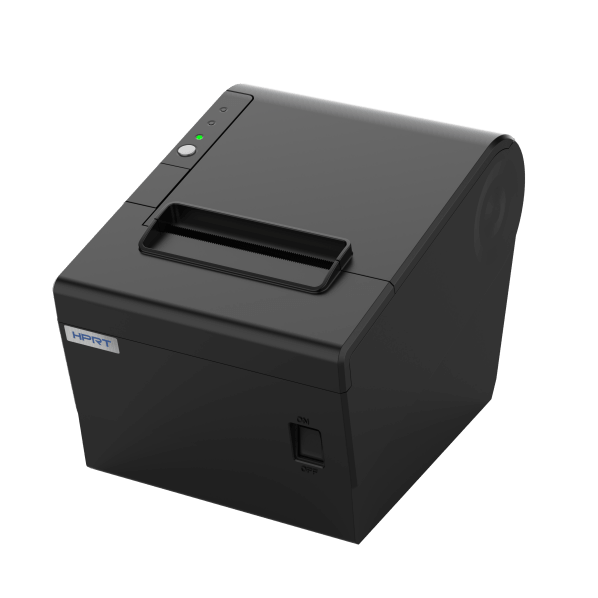
HPRT TP806C: Thermal Receipt Printer for High-Volume Hospital Billing and Pharmacy Workflows

For environments with continuous operation and high transaction volume, the HPRT TP806C serves as the heavy-duty fleet standard.

  • Jam-Resistant Cutting Design: A hobbing cutter structure improves paper feeding stability and reduces jam risks in continuous workflows. The auto-cutter is rated for up to 1,000,000 cuts, supporting long-term operation in high-volume environments.
    • High-Speed Throughput: With print speeds of up to 250 mm/s at 203 dpi, it produces receipts, tickets, and slips quickly, helping to minimize patient wait times during peak hospital traffic.
    • Seamless HIS & Network Integration: Supports USB (B-Type), Ethernet, and optional wireless interfaces, enabling stable deployment in hospital HIS/EMR systems via standard ESC/POS protocols with Page Mode support.
    • Flexible Deployment & Wall-Mount Design: Supports wall-mounted installation for space-constrained billing counters and pharmacy windows, improving counter space utilization and workflow efficiency across multiple hospital scenarios.
    HPRT TP806C: Thermal Receipt Printer for High-Volume Hospital Billing and Pharmacy Workflows
  • Eco-Friendly Printing Support: Compatible with standard eco thermal paper, supporting hospitals in reducing consumable waste and aligning with sustainable procurement policies.

Typical hospital deployment scenarios:

  • • Print head durability: Long-life print head (typically 100–150 km+) to ensure stable output quality under frequent use.
  • • Cutter lifespan: High-cycle auto-cutter designed for long service life in billing and pharmacy operations.
  • • Housing strength: Reinforced structure to resist dust, vibration, and continuous operational stress.

HPRT TP80NC-H - Compact Receipt Printer for Doctor Consultation Rooms & Low-Load Areas

TP80NC-H is a cost-effective thermal printer designed for space-limited clinical environments where printing is intermittent but system reliability remains essential.

  • Ultra-Compact Footprint: Measuring 145 × 123.5 × 121.6 mm (W×D×H), the printer is approximately 40% smaller than conventional desktop models and fits easily on crowded consultation desks or mobile nurse carts.
    • Ultra-Compact Footprint: With micro-dimensions of just 145 × 123.5 × 121.6 mm (W×D×H)—making it over 40% smaller than traditional models—this printer easily slips into tight corners on cluttered doctor consultation tables or compact mobile nurse carts.
    • Ergonomic Side-Opening Design: Uses an innovative side-opening cover structure to simplify paper loading and reduce maintenance time. Supports easy roll replacement and stable paper feeding, helping prevent paper jams during continuous clinical use.
    • Clinical Durability & Dust Defense: Designed for clinical environments, its unique gear dust-proof casing prevents medical lint, powder, and dust from clogging internal gears, ensuring an extended, maintenance-free 100 km TPH lifecycle.
    HPRT TP80NC-H - Compact Receipt Printer for Doctor Consultation Rooms & Low-Load Areas
  • Broad System Compatibility: The model provides comprehensive cross-platform driver compatibility—supporting Windows, Linux, MacOS, OPOS, and JAVAPOS—allowing IT departments to deploy it instantly across diverse operating systems without code modifications.

Typical hospital deployment scenarios:

  • • Doctor consultation rooms
  • • Nurse stations
  • • Small outpatient registration desks
  • • Low-volume departmental service counters

HPRT TP806C vs. TP80NC-H: How to Choose the Right Model

To help hospital procurement teams compare both models more clearly, the following matrix summarizes their key deployment differences across different clinical environments.

Model Target Scenario Print Speed Interface Options Auto Cutter Print Head Life Key Strength
HPRT TP806C Billing counters / Pharmacy / Specimen centers (high-volume) Up to 250 mm/s Standard: USB / Ethernet / RJ11. Optional: RS232 / WiFi / BT Up to 1,000,000 cuts 100 km High stability for continuous peak-hour printing in hospital networks
HPRT TP80NC-H Doctor consultation rooms / Nurse stations (space-limited) Up to 250 mm/s Standard: USB. Optional: WiFi / Bluetooth / Ethernet / RJ11 Up to 1,000,000 cuts 100 km Compact design with low noise and flexible deployment in clinical spaces

Ready to Upgrade Your Hospital’s Printing Infrastructure?

HPRT provides technical support, developer SDKs, and hardware customization for healthcare printing integration. From HIS upgrades to multi-site hospital deployments, our team helps you build a stable, scalable printing system.

Contact HPRT for printing solutions tailored to billing, pharmacy, outpatient, and laboratory workflows.

Frequently Asked Questions

1. What type of thermal receipt printer is best for hospitals?

Hospitals typically use network-enabled thermal receipt printers with EMR and HIS integration. High-volume departments require stable, high-speed output, while clinical rooms require compact and quiet devices.

2. What is the difference between billing and clinic thermal printers?

Billing printers focus on continuous high-volume printing and network sharing, while clinic printers prioritize space efficiency, low noise, and intermittent usage scenarios.

3. Can hospital thermal printers integrate with EMR and HIS systems?

Yes. Most hospital-grade printers support ESC/POS protocols and integrate with EMR, HIS, LIS, and pharmacy systems through USB or Ethernet connections.

4. Why is cutter durability important in hospital printers?

Hospitals process large volumes of receipts daily. A durable auto-cutter (e.g., up to 1,000,000 cuts) helps reduce maintenance interruptions and supports continuous workflow.

5. Is Ethernet better than USB for hospital deployment?

Ethernet is preferred for shared environments like billing and pharmacy, while USB is suitable for single-station setups such as consultation rooms.

SEND INQUIRY NOW

  • Inquiry Type: *
  • Product Type:
  • Name: *
  • Phone Number:
  • Email: *
  • Country:
  • Company Name :
  • Message: *
  •  
Contact
We use cookies to give you the best user experience. By using this site, you agree to its use of cookies.

Send An inquiry

Send An inquiry

    Please provide your name, email, and requirements.

  • Please fill in the type of request.
  • Please fill in your name.
  • Please fill in your correct email address.
  • Select your country/region
  • Please fill in your inquiry content.