

When you need to ship or return a package, printing the shipping label is often the first hurdle—especially if you don’t have a printer. Many people ask: Does UPS print labels for you?
Quick answer:
Yes, UPS can print shipping and return labels at most UPS Store locations if you have a digital label (PDF, email, or QR code). Printing is usually paid, and availability varies by store.
In practice, availability may vary depending on the location, label format, and the seller’s return policy.
This guide explains when and where UPS can print shipping or return labels, what it usually costs, and what to do if you only have your phone or no printer—based on real, day-to-day shipping scenarios.
Where Can You Print UPS Labels? (Quick Comparison)
| Location | Can Print Labels | Label Format Support | Cost / Fee Structure | Best For |
|---|---|---|---|---|
| The UPS Store | Yes | PDF, Email, or QR Code | Paid (Per-page / Service fee) | Occasional Shippers & One-time Returns |
| UPS Access Point | Limited | QR Code Only (Limited) | Free (Merchant-integrated) | E-commerce Returners (Amazon, etc.) |
| Home Thermal Printer (e.g., HPRT SL42) | Yes | Digital File (4x6 / PDF) | Lowest Cost (Consumables only) | Small Business Owners & E-commerce Sellers (Etsy, Shopify, eBay) |
Can UPS Print Shipping Labels?
Yes, UPS can print shipping labels in many cases—especially at The UPS Store locations—if you already have a digital label.
In most real-world scenarios, customers arrive with a label generated online, typically as:
- ● A PDF file
- ● An email attachment
- ● A downloadable shipping label
As long as the label is clear and scannable, UPS Store staff can usually print it without issues. However, you must create the label first—UPS does not generate labels automatically for standard shipments.
Can UPS Print Return Labels?
UPS can print return labels if the label has already been generated by the seller or created by you through UPS.com or a shipping platform. Return eligibility and who pays for return shipping are set by the seller, not UPS.
✔️ The seller emails you a UPS return label (PDF) or provides a return QR code
✔️ The seller allows returns but requires you to create and pay for your own shipping label
In the first case, many UPS Store locations can print the provided return label for you. In the second case, customers commonly create a normal UPS shipping label addressed back to the seller and then choose whether to print it at home or in-store.
Can You Print Labels at The UPS Store?
Yes, most The UPS Store locations offer shipping and return label printing, and they are often the most convenient option if you don’t have a printer and want to handle everything in one visit.
It’s important to note that The UPS Store locations are independently owned and operated franchises. This means that:
- • Printing availability may vary by store
- • Pricing is set locally
- • Some stores may have format or size limitations
For best results, confirm with your local UPS Store before visiting, especially if you have a specific label format or only a digital version on your phone.
Does UPS Charge to Print a Label?
Yes, in most cases, The UPS Store charges a fee to print shipping or return labels, with prices set by each individual store.
Based on common store practices, customers should expect:
- •A per-page printing fee
- •Possible price differences between plain paper and label stock
- •In some locations, an extra charge if staff assist with file retrieval or computer use
For occasional shipments, the cost is small. But for frequent shipping, repeated fees can quickly add up.
How Can I Print a UPS Shipping Label Without a Printer?
If you don’t have a printer, you can:
- •Create your shipping label online
- •Save it as a PDF or email
- •Visit a UPS Store for printing
This is a common solution for one-time shipments. In real-world use, many customers simply keep the label on their phone, visit a UPS Store, and ask staff to print it.
The main trade-offs are waiting time and printing fees, which become more noticeable with frequent shipments.
Can UPS Print a Label From My Phone?
Yes, many UPS Store locations can print labels directly from your phone if you have a PDF, email attachment, or supported QR code.
Typical phone-based workflows include:
- Forwarding the label email to the store’s print address
- Opening the PDF on a store computer with staff assistance
- Presenting a QR code that staff can scan to retrieve the label
Tip: Download your label in advance or save a QR code screenshot to avoid delays caused by weak in-store reception.
Can UPS Access Points Print Labels?
Most UPS Access Point locations do not offer general label printing, although some can print labels as part of specific QR-code-based return programs.
Access Points are designed mainly for package pickup and drop-off. In certain retailer-integrated return flows, the location scans your QR code, prints the label through its system, and attaches it to the package. Outside of those workflows, Access Points should not be treated as full printing locations.
Who Is Responsible for Providing a UPS Return Label?
The seller or merchant is responsible for providing a UPS return label and defining the return terms, not UPS.
In practice:
- If the seller’s return page includes a “Get UPS Return Label” option, the label is merchant-provided
- If the policy states “customer pays return shipping,” you will usually need to create and pay for your own UPS shipping label
Is It Better to Print UPS Labels at Home?
For occasional shipments, paying a small in-store printing fee can be a convenient short-term option.
However, as shipping volume increases, many individuals and small businesses switch to home label printing to reduce recurring costs, save time, and gain more control over their workflow.
Print UPS Labels Faster with a Thermal Label Printer
For regular shipping, many individuals and small businesses switch to thermal label printers to simplify their workflow.
Printing labels at home with a 4x6 shipping label printer allows you to:
- ● Avoid per-label printing fees charged by stores
- ● Prepare shipments immediately, without waiting for store hours
- ● Batch print multiple labels for daily or weekly shipping runs
- ● Drop off packages faster, with labels already attached
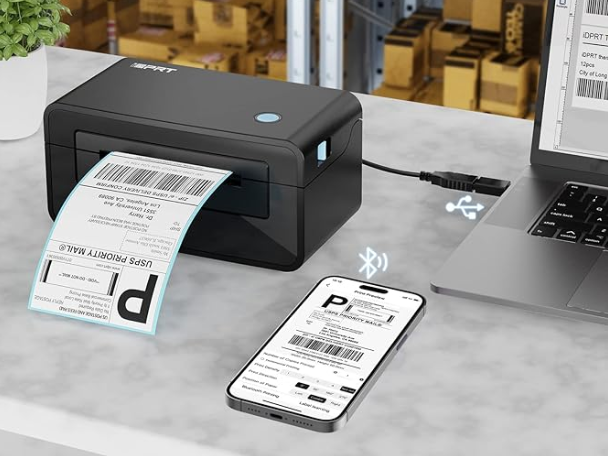
For businesses that ship regularly, investing in a reliable label printer can quickly pay for itself by reducing time and ongoing costs.
HPRT thermal shipping label printers are designed for daily use, providing fast printing, clear barcodes, and reliable performance. These cost-effective label printers require no ink or toner and are perfect for printing product barcodes, labels, and waybills for e-commerce, logistics, and warehouses. Easy to use, they are an ideal solution for both small businesses and personal use.
Highly Recommended UPS Shipping Label Printers for 2026
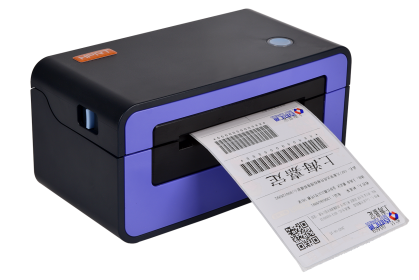
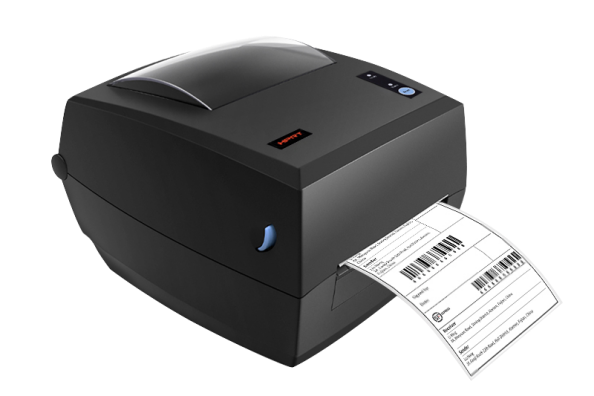
Recommended reading:
Key Takeaways for UPS Label Printing
UPS offers several ways to handle shipping and return labels, but printing services depend heavily on location and workflow. Knowing when to use a UPS Store, when an Access Point is sufficient, and when home printing makes sense helps avoid delays and unnecessary costs.
For occasional shipments, store printing is convenient. For consistent shipping volume, printing labels at home provides better control, speed, and long-term efficiency.
FAQs About UPS Label Printing
1. Does UPS print labels for free?
No, most UPS Store locations charge a fee for printing labels.
2. Can UPS print a label from my phone?
Yes, as long as you have a PDF, email attachment, or QR code.
3. Do UPS Access Points print labels?
Usually no, except for certain QR-code-based return services.
4. Do I need to create the label before going to UPS?
Yes, in most cases you must generate the shipping or return label in advance.
5. What is the easiest way to print UPS labels for frequent shipping?
For frequent shipping, printing labels at home with a thermal label printer is usually faster, more cost-effective, and more efficient than relying on store printing.




