

Scrapbooks are created to preserve memories, yet many scrapbook albums remain unfinished.In most cases, this is not due to a lack of creativity, but to a process that becomes slow and difficult to sustain over time.
Common challenges include time pressure, excess scrapbook paper and scrapbooking stickers, and scrapbook design ideas that look appealing on individual pages but are hard to repeat across an entire album. When every page requires new decisions, progress slows and motivation fades.

This guide focuses on efficiency-driven scrapbooking, explaining how streamlined workflows help keep scrapbook pages meaningful while allowing scrapbook albums to be completed.
The Real Bottlenecks in Scrapbooking (Beyond Creativity)
1. Where Time Is Actually Lost
In most scrapbooks, time is not lost during storytelling, but during preparation, repetition, and hesitation.
- ●Rewriting captions and dates for every page instead of reusing simple text structures
- ●Searching through piles of scrapbook paper to find the “perfect” pattern for each layout
- ●Choosing between dozens of scrapbooking stickers for pages that only need one visual accent
These small delays accumulate quickly. What begins as a short creative session often turns into a long and tiring process, making it harder to maintain momentum across a full scrapbook album.
2. Why More Supplies Don't Mean Better Scrapbooks
An abundance of scrapbook paper and scrapbooking stickers often increases decision fatigue rather than supporting creativity.
When every page demands a different combination of materials, visual consistency disappears and progress slows. Excess supplies introduce hesitation and second-guessing at every step, as more options require more decisions.
By contrast, scrapbook albums built on a limited and repeatable set of materials are usually completed faster and feel more cohesive when revisited later. Fewer materials often lead to clearer structure and a more consistent visual flow across pages.
3. How Rising Expectations Become a Hidden Bottleneck
Many scrapbook albums remain unfinished not because pages are difficult to make, but because expectations gradually increase over time.
Visual inspiration can be useful, but when aesthetic standards rise with every page, they become difficult to sustain across an entire scrapbook album. Treating each page as a separate showcase increases pressure and slows decision-making.
As expectations grow, more adjustments feel necessary and mental fatigue appears sooner. Even simple layouts can take far longer than intended, reducing the likelihood that the album will be finished.
Rethinking Scrapbook Design — Emotional vs. Structural Elements
1. What Should Stay Handmade
Certain elements benefit from remaining handwritten because they carry personal meaning that cannot be standardized:
- ●Personal journaling and emotional reflections
- ●Notes in baby scrapbook or wedding scrapbook pages where the message matters more than layout precision
These handwritten details preserve individuality and emotional depth within scrapbook albums.
2. What Can Be Standardized
Other elements repeat frequently across pages and do not require handwriting every time:
- ●Dates, locations, and short factual notes used throughout the album
- ●Page titles and repeated phrases in travel scrapbook layouts, such as “Day 1,” “Hotel,” “Highlights,” or “Local Food”
Allowing printed or repeatable text to handle these structural elements reduces effort while improving consistency across the scrapbook album.
3. Letting Go of Perfectionism in Scrapbook Design
One of the most effective scrapbook design ideas is learning to step away from perfectionism.
Highly stylized layouts often require extensive material coordination and repeated revision, which can turn a simple page into an hour-long task. As page counts increase, this level of effort becomes difficult to sustain.
Experienced scrapbookers often shift their focus from visual perfection to completion. Pages are finished in one session, small imperfections are accepted, and storytelling takes priority over decoration.
Scrapbooks are typically revisited for memories rather than layout precision. For this reason, a completed scrapbook album often holds more long-term value than a few visually perfect but isolated pages.
The 30-Minute Page Rule for Scrapbook Albums
1. Why Time Limits Improve Completion Rates
A simple rule used by experienced scrapbookers is the 30-minute page rule:
- ●One page is completed in one session
- ●When the timer ends, the page is considered finished
A simple rule used by many experienced scrapbookers is the 30-minute page rule.
One page is completed in one session, and when the timer ends, the page is considered finished, even if a few details could be adjusted.
This timebox prevents endless revisions and builds momentum across the entire scrapbook album, which is especially important for long-term projects where consistency matters more than perfect details.
2. A Fast, Repeatable Page Layout
This structure is often referred to as the 30-Minute Scrapbook Layout:
- ●One main photo to anchor the story
- ●Two to three supporting images for context
- ●One caption or label for the key message
- ●One decorative accent, such as paper, washi tape, or a single sticker
This layout works well for baby scrapbook milestones, travel scrapbook spreads, and wedding scrapbook albums, with only minor variations.
Scrapbook Layout Ideas by Theme
1. Baby Scrapbook
- Monthly milestone labels
- Simple photo grids showing growth over time
- Minimal captions focused on dates and moments
2. Travel Scrapbook
- Map strips or route headers
- Day-by-day titles and location labels
- Collage layouts combining scenery, food, and details
3. Wedding Scrapbook
- Clear sections for ceremony, reception, and details
- Consistent typography for names and dates
- Balanced layouts that highlight key moments without overcrowding
4. Family Scrapbook
- Year-by-year or event-based sections
- Group photo layouts with short name or date labels
- Repeated page structures for holidays and gatherings
5. Holiday or Seasonal Scrapbook
- Section headers for each holiday or season
- Reusable layouts for recurring events (e.g. birthdays, New Year, vacations)
- Simple decorative accents paired with consistent captions
6. Memory or Life Moments Scrapbook
- One-page layouts focused on a single moment or story
- Photo + short narrative structure
- Limited decoration to keep attention on the memory itself
Organizing scrapbook layouts by theme helps maintain consistency while allowing creative variation. It also makes efficiency-focused workflows easier to apply across different scrapbook albums.
Smarter Photo Workflows for Scrapbooking
1. Batch Printing vs. On-Demand Printing
Two photo workflows are commonly used:
- • Batch printing works well for full scrapbook albums, such as trips, weddings, or a baby's first year
- • On-demand printing suits highlight pages or special moments that deserve focused attention
Many scrapbookers combine both approaches depending on the project stage.
2. Why Small Photo Prints Work Better in Scrapbooks
Smaller photo prints integrate naturally with standard scrapbook paper sizes and page protectors.
They allow flexible collage layouts and reduce cropping waste, especially in travel scrapbook pages with many scenes. For guidance on selecting the right printer to produce high-quality small prints that work well in scrapbooks, see Best Photo Printers for Creating Photo Journals and Scrapbooking.
3. Choosing the Best Photo Printer for Scrapbooks
For scrapbooking, compact photo printers often fit creative workflows better than large office machines:
- • Wireless printing from phones keeps editing and layout decisions within the same session
- • Instant, no-warm-up printing supports short, focused scrapbook sessions
- • Dedicated photo printers avoid interruptions caused by external printing services
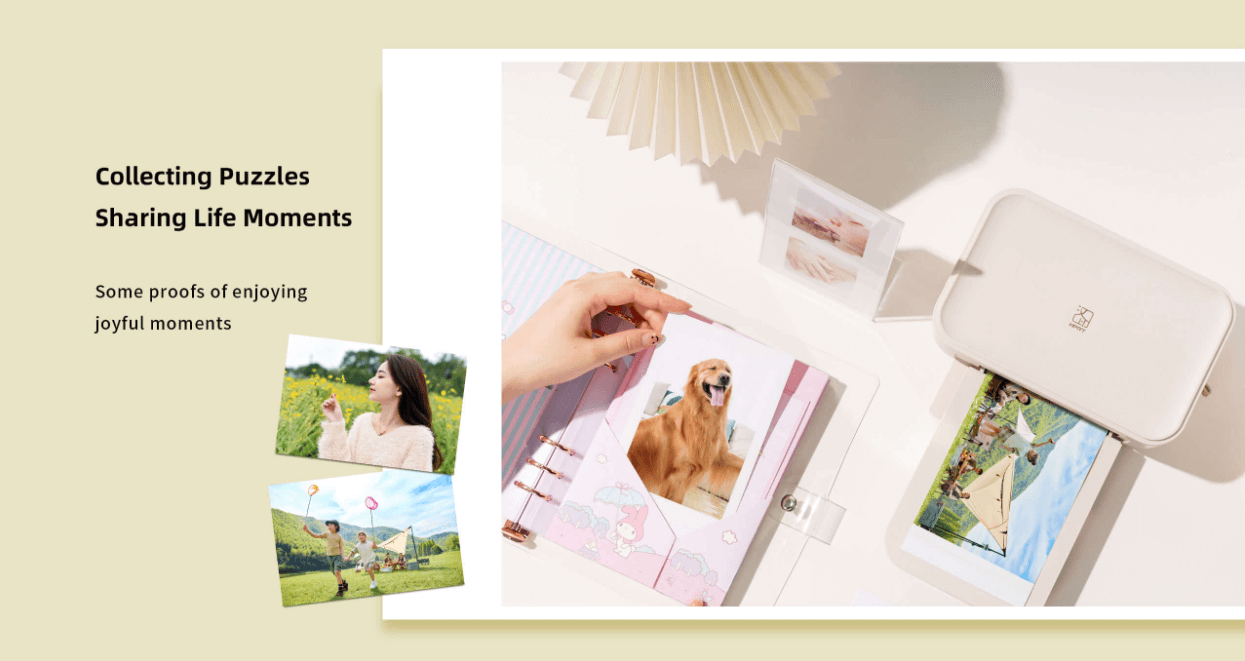
A mobile photo printer such as Hanin(HPRT) CP4100 is designed specifically for this kind of hands-on creative use. It uses thermal dye-sublimation printing technology to produce true 4×6-inch photo prints at 300 dpi, delivering smooth color transitions and accurate detail without ink cartridges.
Unlike standard inkjet prints, each photo is automatically sealed with a transparent protective layer, helping protect scrapbook photos from fingerprints, moisture, dust, and surface scratches over time.This durability is especially valuable for scrapbook albums that are frequently handled or revisited years later.
With Wi-Fi connectivity, scrapbookers can print directly from a smartphone using a companion app, keeping photo selection, layout decisions, and printing within one uninterrupted workflow. The compact footprint also makes the printer easy to keep on a craft desk or store nearby, supporting spontaneous printing whenever inspiration strikes.
Using a Label Printer to Simplify Scrapbooking
1. Labels as Functional Scrapbooking Stickers
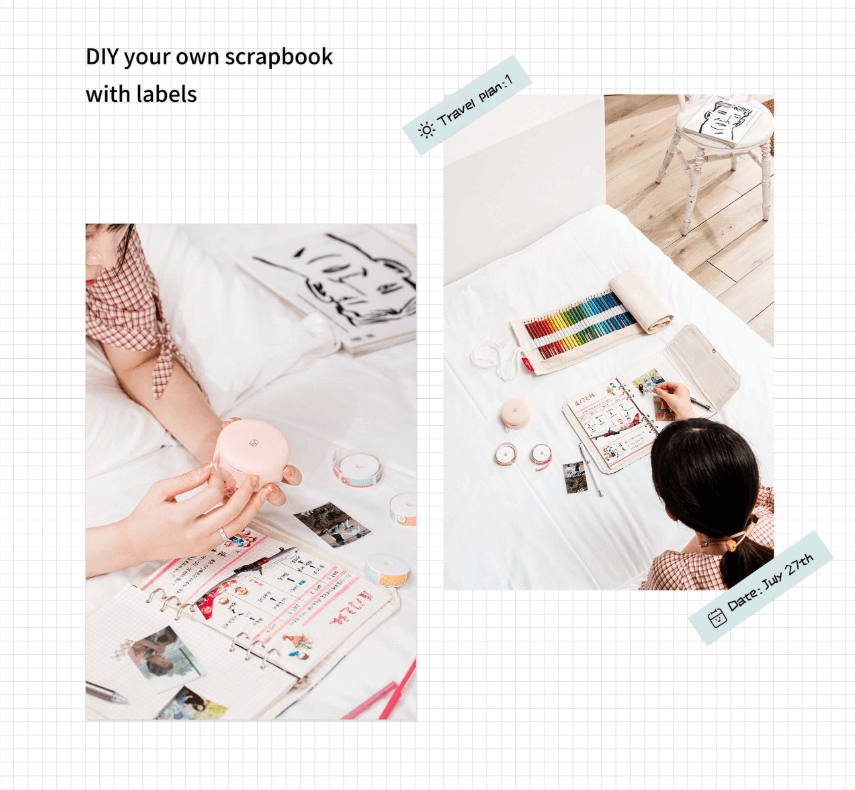
Printed label strips can function as minimalist scrapbooking stickers with clean, consistent typography.
On-demand labels reduce excess sticker stock and help maintain visual rhythm across pages.
2. Practical Label Use Cases
- • Date strips for baby scrapbook timelines
- • Day headers for travel scrapbook layouts
- • Section titles in wedding scrapbook albums, such as “Ceremony” or “Reception”
3. Why Mini Label Printers Fit Scrapbook Desks
Mini label printers are designed for short, repeatable text tasks, making them especially compatible with scrapbook workflows.
A compact model such as Hanin H11 mini label printer weighs only 112 g and uses thermal, ink-free printing, eliminating the need for cartridges or liquid ink. This low-maintenance design makes it easy to print labels frequently without setup friction.
Additional features that suit scrapbook use include:
- • Bluetooth connectivity, allowing quick label creation directly from a smartphone
- • Touch-button operation and magnetic cover, supporting simple, distraction-free use
- • Pre-designed templates and patterns, which help create consistent labels for dates, titles, and captions
Over time, a mini label printer can quietly replace large collections of redundant scrapbooking stickers. Instead of choosing from dozens of decorative options, scrapbookers can generate clean, purpose-built labels that support clarity, consistency, and faster page completion.
Reducing Supply Hoarding with On-Demand Printing
1. Why Scrapbook Supplies Accumulate
Scrapbook paper and stickers are often purchased for future projects. Over time, duplicate styles and unused leftovers create clutter and slow decision-making.
2. A Minimalist Scrapbooking Strategy
- • Print only what is needed for the next few layouts
- • Use scrapbook paper mainly for structure, such as backgrounds and simple mats
- • Let photos and stories carry the page, with decoration serving a supporting role
An Efficient Scrapbooking Workspace Setup
1. Essentials Within Reach
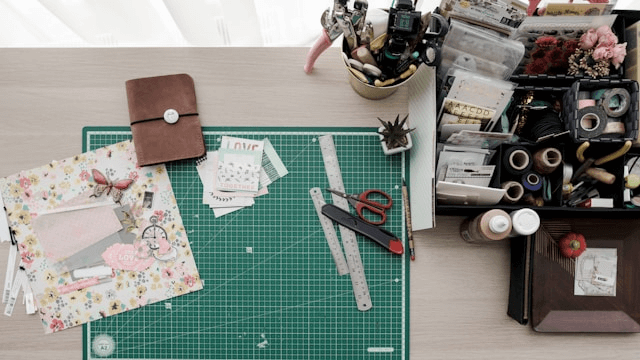
An efficient workspace keeps only essentials on the main surface:
- • Adhesives and cutting tools
- • One or two pens
- • A photo printer and a label printer
- • A small, pre-selected kit of scrapbook paper and scrapbooking stickers
2. What Should Stay Out of Sight
Bulk paper, unused stickers, and seasonal decorations are best stored away from the desk.
Reducing visual noise helps keep attention focused on photos and storytelling.
Efficiency Does Not Reduce Emotional Value
Standardizing structural elements does not make scrapbook pages impersonal. Clear, repeated layouts highlight handwritten notes and make emotional content easier to notice and reread.
Finished scrapbook albums preserve complete stories, which ultimately hold more value than perfectly styled but unfinished projects.
Conclusion: Better Workflows Lead to Better Scrapbooks
Scrapbooks are about preserving memories, not achieving perfection through excessive decoration.
Efficient systems—such as 30-minute layouts, thoughtful photo workflows, and hybrid text supported by photo and label printers—help creators complete baby scrapbook, travel scrapbook, and wedding scrapbook albums with less stress.
For creators looking to build a more consistent and efficient scrapbooking workflow, Hanin provides compact photo printers and mini label printers designed to support on-demand printing and repeatable layouts without disrupting the creative process.
If you would like to explore practical printing tools that fit seamlessly into scrapbook workflows, contact us to learn more about Hanin's photo and labeling solutions.
Ready to explore practical printing tools?
Contact UsFrequently Asked Questions (FAQ)
Q1: What size photos work best for scrapbook albums?
Smaller photo prints are generally more flexible for scrapbook albums. They fit standard scrapbook paper sizes more naturally, allow collage-style layouts, and reduce cropping waste. Larger photos can still be used as focal points, but mixing sizes often improves layout efficiency.
Q2: What type of scrapbook paper is easiest to work with for beginners?
Neutral or lightly patterned scrapbook paper is easier to reuse across multiple pages. Simple backgrounds reduce visual clutter and make it easier to maintain consistency throughout an album, especially for large projects such as travel scrapbook or baby scrapbook albums.
Q3: How do scrapbookers finish albums faster without sacrificing quality?
Finishing scrapbook albums faster usually involves limiting page layouts, setting time boundaries, and reducing repeated manual tasks. Many experienced scrapbookers rely on repeatable layouts, batch photo preparation, and a hybrid approach to text to maintain both efficiency and emotional value.
Q4: Are scrapbooking stickers necessary for every page?
Scrapbooking stickers are optional rather than essential. Many pages only need one visual accent, while others work well with photos and text alone. Using fewer stickers often improves consistency and reduces decision fatigue, especially in large scrapbook albums.
Q5: How can perfectionism be avoided when scrapbooking?
Perfectionism can be reduced by redefining success as page completion rather than visual perfection. Treating scrapbook pages as personal records rather than display pieces helps maintain momentum and prevents albums from being left unfinished.
Q6: What is the best photo printer setup for scrapbooking at home?
For scrapbooking, compact photo printers that support wireless, on-demand printing tend to integrate well into creative workflows. Keeping photo editing, printing, and layout decisions within the same session helps reduce interruptions and supports short, focused crafting sessions.
Q7: How can a label printer be used in scrapbooking?
A label printer can be used to print dates, locations, page titles, and short captions. These printed labels function as minimalist scrapbooking stickers, helping maintain consistent typography while reducing the need for excess decorative supplies.




